How a Portable Smart TV Can Follow Your Routine Instead of Taking Over a Room
A flexible screen can fit the moment instead of claiming permanent space. See how PackGo moves from room to room and beyond.
Recent Blogs
-
The Must-Have Camera for Every First-Time Parent
-
Pins & Aces Golf Accessories Guide: Smart Shopping Tips
-
Discover Beautiful Yarn and Craft Supplies with Sirdar
-
Tegen Accessories Review: Elevate Your Hair Game with Stylish Clips and Claws
-
Why People Are Choosing E-Bikes More In 2025
-
A Look at How the Pebblebee Tag Universal Helps You Track Smarter
-
Explore Premium Cannabis Products with Botany Farms
By admin
·August 26 16
All featured products are selected by our editors and may include affiliate links. If you purchase through these links, we may earn a commission.
A Portable Smart TV makes sense when your day happens in more than one place. You may start in the kitchen, work from a spare room, relax in the bedroom, then spend an evening outside.
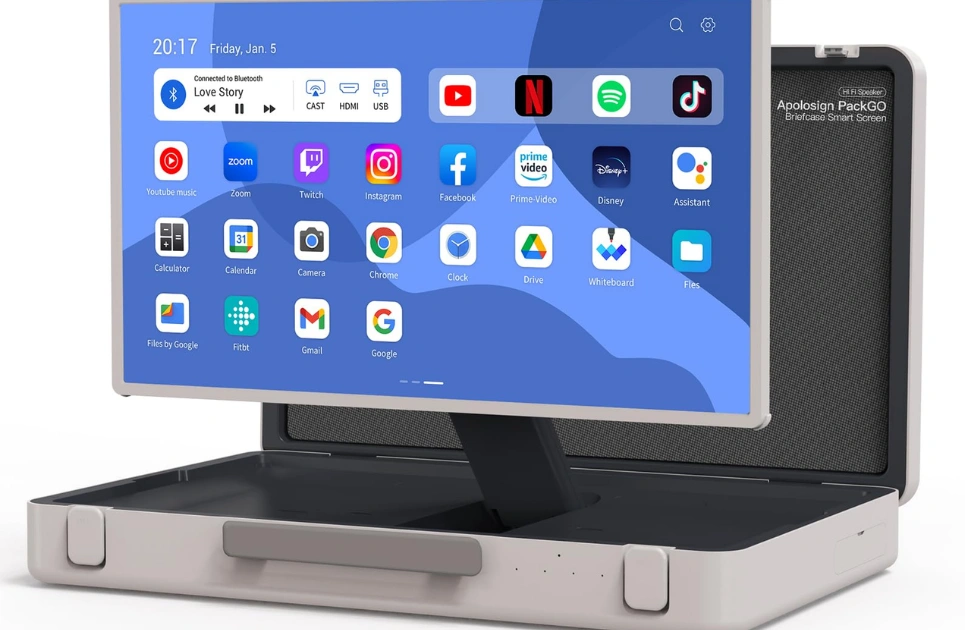
Apolosign PackGo 27-inch Briefcase Portable TV is designed around that movement. This guide looks at how its briefcase format, battery, touchscreen, Android system, and connections can fit everyday routines without requiring another permanent screen.
Why One Flexible Screen Can Make More Sense Than Another Fixed TV
The television decides where you watch, in silence. Changing rooms, changing gadgets, when you are mounted or put on furniture. That arrangement works in a main living area but less so in apartments, guest rooms, kitchens or multi-purpose rooms.
Some individuals like the flexibility, as recent Reddit conversations over portable screens illustrate. One participant said they would only bring a screen into the bedroom when they wanted to, while another said a portable display came in handy between the kitchen, dining room and workspace.
One screen might cover numerous moments without occupying each space permanently. That is where a Personal TV starts to feel practical. One display can be stored after use and brought back when a larger picture adds something to the moment.
How Apolosign PackGo Makes a Large Screen Easier to Move
Open the Briefcase When You Need a Bigger Screen
PackGo places a 27-inch 1080p touchscreen inside a rugged briefcase-style body. There is no separate floor stand to assemble or roll through the home. Open the case, position the screen, and the Portable TV Screen is ready for apps, streaming, gaming, or connected devices.
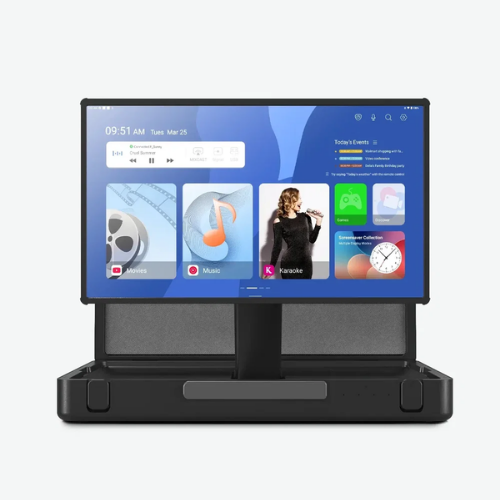
The storage is likewise different in that type. A normal TV has a tendency to remain on even when it is turned off. PackGo can be closed and pushed aside, and sometimes that matters in a studio apartment, flexible guest room or home office.
Use Battery Power When an Outlet Is Inconvenient
Apolosign rates the built-in battery for up to six hours of playtime. That gives the Portable Smart TV useful cordless time for common viewing sessions, although actual endurance can vary with brightness, volume, connections, and workload.
Battery habit deserves care. People talking about portable screens on Reddit say the convenience of portability doesn’t seem quite so beneficial when you forget to recharge between sessions. It’s logical to think of PackGo as a big portable machine. Recharge after a longer period of use rather than later finding an empty battery.
Rotate the Display to Suit Different Content
PackGo allows you to switch the screen automatically between landscape and portrait viewing. Landscape is best for movies, gaming, presentations and most TV shows. Some apps or vertically formatted material can be more naturally used in portrait orientation.
The 10-point touchscreen also reduces dependence on the included Bluetooth remote when you are close to the display. Having both control methods suits a screen that may move from a table to a bedroom or temporary workspace.
Ways to Use a Personal TV Throughout an Ordinary Day
Bring Entertainment Into the Kitchen Or Bedroom
Kitchens and bedrooms are mentioned again and again in discussions of moveable screens. Reddit users have reported watching recipes on a bigger screen, watching as they eat, and bringing a screen into the bedroom without having a TV there all the time.
PackGo suits those short-term setups because Android provides access to Google Play Store apps, while the built-in 40W speaker system means another speaker may be unnecessary. A larger screen can also be easier to glance at from across a room than a phone beside the chopping board.
Move Viewing Outside For Relaxed Evenings
A portable smart TV can turn a regular nite into a patio or covered outdoor space. PackGo has 450 nits of brightness so where you put it matters. Apolosign advises a shade for better visibility in bright sunlight.
A covered patio, canopy, or shaded table can reduce glare. Evening use is naturally less demanding on screen brightness and may make the 27 inch display easier to enjoy from a comfortable distance.
Turn The Screen Into a Larger Display for Gaming Or Work
PackGo includes HDMI, USB-A, and two USB-C ports, plus wireless connectivity. A console, laptop, or other compatible device can use the screen when a larger temporary display is useful. The built-in battery can also provide external power, including support for charging a Nintendo Switch through USB-C. For occasional gaming or remote work, that can reduce separate power needs. Pack the required cable before leaving home.
How to Get More from Apolosign Portable TV Away from Home
Apolosign Portable TV is easier to live with when a few setup choices are made before the screen leaves its charging spot.
- Charge before a longer outing and lower brightness when full output is unnecessary.
- Choose shade outdoors to improve visibility.
- Pack the remote and any cable needed for a console or laptop.
- Download needed apps while reliable WiFi is available.
- Test Bluetooth headphones in advance because Bluetooth Speaker mode must be turned off before external Bluetooth audio devices can connect.
Those few steps eliminate friction. A charged, plugged-in, and ready-to-go screen is more beneficial than one that needs fixing after everyone’s settled in.
Apolosign support also highlights charging, screen mirroring, hotspot connections, Bluetooth setup, and app installation among common PackGo questions, which makes preparation especially worthwhile.
FAQs
How Long Can Apolosign PackGo Run on Battery?
Apolosign says it can last up to six hours on its 14.6V 6800mAh lithium-ion battery. Battery life depends on usage and configuration and will vary. Actual results will vary.
Can You Download Apps on PackGo?
Yes. PackGo runs Android and supports Google Play Store access. Apolosign support confirms that apps can be downloaded directly to the device.
Can PackGo Connect to Bluetooth Headphones?
Yes, with an extra setting. Apolosign says Bluetooth Speaker mode is enabled by default. That mode must be turned off before selecting external Bluetooth devices such as earphones.
Can You Use PackGo Outside During the Day?
Yes, although shade is the sensible setup. The display is rated at 450 nits, and Apolosign recommends a tent, awning, or other shaded area for better visibility in bright conditions.
Apolosign PackGo makes the most sense when one large screen needs to fit several parts of daily life instead of staying permanently in one room. Apolosign combines a briefcase design with battery power and Android, giving people the freedom to bring a bigger screen where it is useful and store it when it is not.
Follow TrendyTempo for more practical insights and updates on technology.
Our Top Picks










Recent Blogs
-
The Must-Have Camera for Every First-Time Parent
-
Pins & Aces Golf Accessories Guide: Smart Shopping Tips
-
Discover Beautiful Yarn and Craft Supplies with Sirdar
-
Tegen Accessories Review: Elevate Your Hair Game with Stylish Clips and Claws
-
Why People Are Choosing E-Bikes More In 2025
-
A Look at How the Pebblebee Tag Universal Helps You Track Smarter
-
Explore Premium Cannabis Products with Botany Farms